Call logging is mostly practiced by business personals who communicate a lot, either through telephones or mobile. It helps you collect technical and statistical data, which is later evaluated and reported to enable you to get essential information from it. However, before you proceed to call logging, you must develop a call log template to put down the entire calls you receive and dial daily.
With a call log template, you have to indicate the incoming calls’ origin and outgoing calls’ destination. You must also write down the beginning and end times of every call. It is appropriate for you to include more information, like the characteristics of the call. Remember, these logs are specifically used to record or register the outgoing and incoming calls each day and other details.
What is a Call Log?
A call log is a process of collecting, recording, and analyzing data of telephone calls. This data entails the length of your call, transmission details, call destination, and origin. You might also include when the call started and ended.
What Is a Call Log Template?
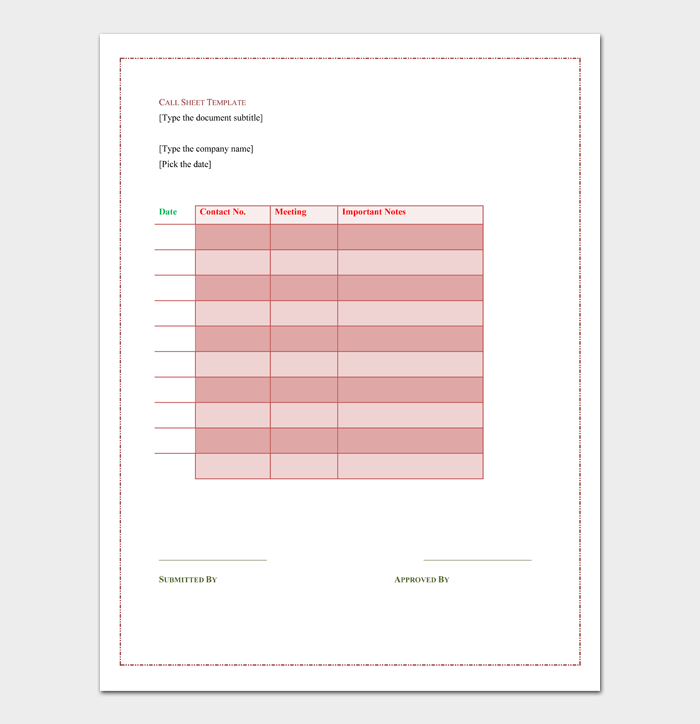
A call log template is a printable blank document that allows you to record information about the outgoing and incoming calls efficiently.
Essential Elements of a Call Log Template
You can easily customize your manual call log template to come to terms with your special business requirements. To achieve call logging, you must understand the essential elements of a call log template. Below are a few elements of a call log template:
- Date
- Time
- The name of the employee
- Name of the dialer
- Suppose the call was responded to or a message was sent
- The duration or length of the call
- Follow up notes
- Billable hours
- Provided resolution notes
Besides, the manual call log template is likely to capture more details about each call. It will alert you more about the call and the result of the call. It also indicates your relationship with the client from the start. Bear in mind that you can add more elements to your call log template to acquire more information.
Call Log Templates & Examples




How to Make a Call Log Template (in Excel)?
It is easy to use Microsoft Excel to create your call log template. However, some people prefer creating their call log template via their chosen software. Those who use Microsoft Excel allow them to create the log to write down all the outgoing and incoming communication on the Excel workbook. This is likely to be more convenient as well as organized.
On the other hand, Excel has an in-built template with tables you can easily assign and sort categories like end time and start time of the call, phone number, and names, among many more details. It keeps your whole data organized, allowing you to view it easily, either on the screen or on a piece of paper. Similarly, you can use a ribbon tool to personalize your template. This assures you that your entire call log content is meaningful. Below are several steps of how to make a call log template in Excel:
- Step 1- Commence by opening the Microsoft Excel software
- Step 2- Click the file and select new to see a page with a variety of template thumbnails
- Step 3- Click the search section and type in the call log. Press enter to observe results
- Step 4- Select the Sales Call Log and Organizer, proceed and thumbnail it to have a larger view of it, and read its description. If whatever you find is satisfying, download it or copy it to an Excel workbook file. Before you commence editing, ensure that you have saved the document
- Step 5- Dial on the lower sheet tabs to have a clear view of the worksheet on the screen.
- Step 6- Commence customizing the Excel table design by clicking on a single cell. After that, click the design tab located on your table tools ribbon.
- Step 7- Click on the More button, situated on the styles gallery, enabling you to open your table styles chart.
- Step 8- Pass your cursor over the thumbnail to preview the effects of your table style. When you are through, please choose the one that makes you happy and apply it to the entire worksheet to have one design.
- Step 9- In your client contact info worksheet, ensure you put the entire data of your contacts, like the numbers and names.
- Step 10- Combine, and enter the full details of your calls on the Sales Call Log Sheet. Examine the applicable items and update your checklist worksheet.
- Step 11- Ensure that you save the workbook in the folder you will easily remember.
- Step 12- You can opt to make a blank call log template and distribute it to your employees to begin filling it out. Likewise, you can email them to fill online.
The Benefits of Using a Call Log Template
The call log template allows employees to record accurate information to make wise decisions. Many people love the call log template because of its benefits, which includes:
- It delivers maximum performance in measuring staff’s call tracking accuracy
- Keeps detailed call-related records via maintaining solid CRM practices
- It assists you to stay with your pocket means by monitoring the call duration averagely
- It boosts your clients’ relationships as well as the top-quality services you generate
- Keeps the entire records of incoming and outgoing calls
- It keeps the whole team aware of whole call-related details
- Tracks patient, client, or customer call-related action
Tips for Improving Your Call Logging Process
A call log template keeps the records of incoming and outgoing calls of your business partners, patients, clients, customers, and sales lead. This means your team should be keen enough to notice any new crucial important call-related information. Besides, it would help if you also familiarize yourself with tips for enhancing your call logging. Here is an overview of several tips for improving your call logging process:
All your call log information should be accessible
Whenever you come up with a call log template, ensure that what you choose can be accessed and utilized by each individual of your team. Moreover, for easy sharing, you can save this template in Google drive via Google sheet call log template, collect Google Docs, PDF documents to the central repository, Word or Excel.
Confirm that both you and your team have entered the call log details appropriately
You never know, sometimes your patient, customer, or client information can change quickly. Therefore, the call log template helps you to keep accurate records of your client. In addition, this level of detail will enable you and your entire staff to make an informed decision and take the correct action if need be.
Utilize the template to write down all call-related details
A call log template lets you capture all your patient interaction, client, or customer information. If you achieve this effectively, every member of your organization will know where to access the information if they encounter call-related information.
Choose a call log template that meets your demands It does not matter whether you are a starter or an established organization. Ensure that you choose a call log template that meets your needs efficiently. It must also generate a perfect call logging detail level.
Final Thoughts
Whether you have a small business or organization, a call log will help you gather information on incoming and outgoing calls. The records you keep will be essential for future reference, resolving problems and customer complaints. It ensures that everything is organized and there is no confusion. Therefore, consider a call log template to record your outgoing and incoming calls all the time.